





2026/02/22 Microsoft Cloud Solutions 417 visit(s) 3 min to read
Ctelecoms
Microsoft’s January 2026 update for Teams introduced a range of new features, many of which are being showcased at Integrated Systems Europe (ISE) 2026 and rolling out gradually across organizations.
These updates highlight how Microsoft Teams continues to evolve as an AI-powered collaboration platform, with enhancements across meeting rooms, calling, events, and communities. Below is a clear overview of the key January updates IT teams should be aware of.
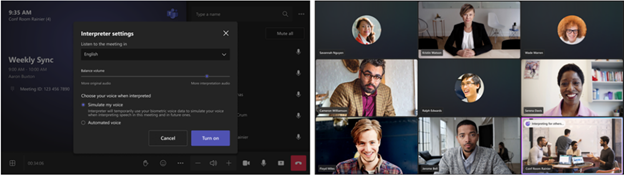
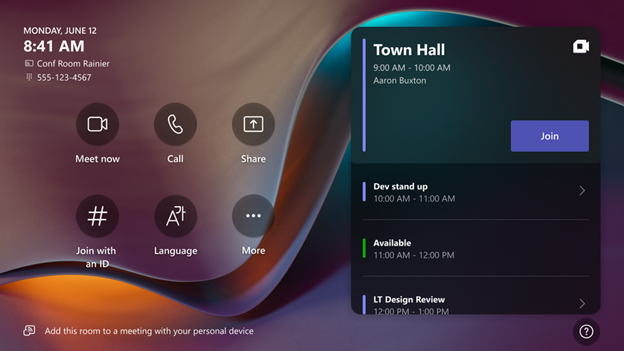
Teams Rooms on Windows now support an Interpreter agent in scheduled meetings. This allows participants to listen to the meeting in their preferred language with real-time translation, making multilingual meetings easier and more inclusive.
Available with Teams Rooms Pro.
The Pro Management portal now provides deeper insights into Teams Rooms usage. IT teams can analyze room utilization based on:
These insights help organizations optimize meeting room usage and plan future investments more effectively.
Voice enrollment in Teams is becoming faster and easier. Users can register their voice by simply speaking during a meeting when prompted.
This enables features such as:
Admins can manage availability at the tenant level.
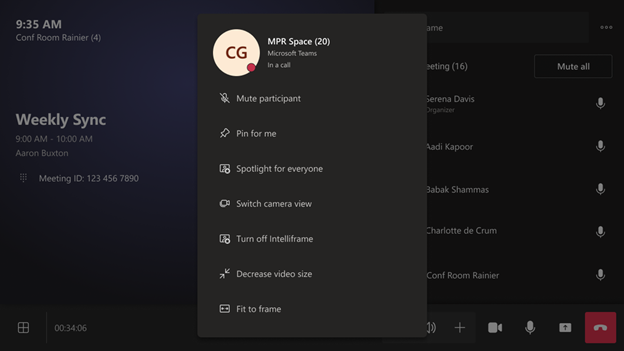
When joining meetings with Teams Rooms that use multiple cameras, participants can now switch camera views directly from the console, participant panel, or touch board. This gives users more control over how remote rooms are displayed.
Microsoft has expanded Direct Guest Join (DGJ) to support two-way interoperability between Teams and Google Meet.
This means:
This update simplifies cross-platform collaboration.
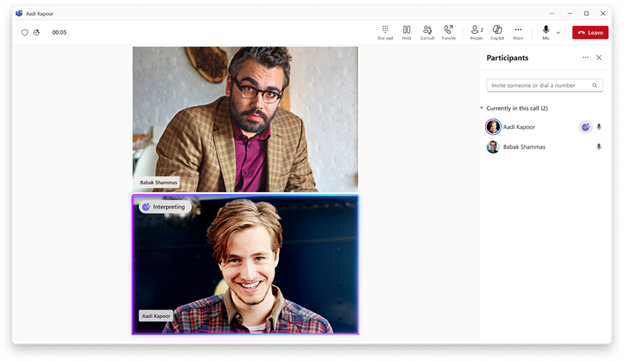
The Interpreter feature is now expanding beyond meetings to Teams Phone VoIP calls. It supports real-time speech-to-speech translation in up to nine languages, allowing participants to speak and listen in their preferred language.
This is especially valuable for global teams and customer-facing roles.
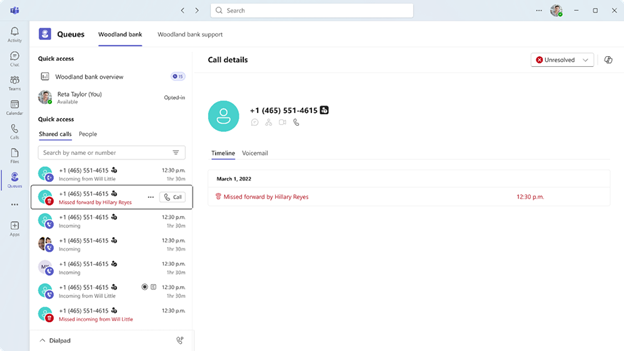
The Queues app now includes a shared history of calls and voicemails, making it easier for service teams to track customer interactions.
Teams can view:
This improves visibility, reduces duplicated follow-ups, and ensures no customer call is missed. Admins control access permissions.
Microsoft has introduced a redesigned Teams events experience that brings event creation, discovery, and management into a single workflow.
Key improvements include:
This update provides more control for organizers and a better experience for attendees in digital and hybrid events.
Communities are now integrated directly into Microsoft Teams, appearing alongside chats and channels.
Employees can:
Existing Viva Engage communities are accessible and manageable from within Teams.
The January 2026 Teams updates reinforce Microsoft’s focus on AI-powered collaboration, inclusivity, and cross-platform interoperability. With smarter meeting rooms, real-time language support, improved calling features, and enhanced event and community experiences, Microsoft Teams continues to mature as a central workplace platform.
For IT teams, now is the right time to review these updates and plan adoption across users, meeting spaces, and communication workflows.
Ready to optimize your Microsoft Teams environment? Ctelecoms is here to help.

Upgrade your IT to be as agile and efficient ...