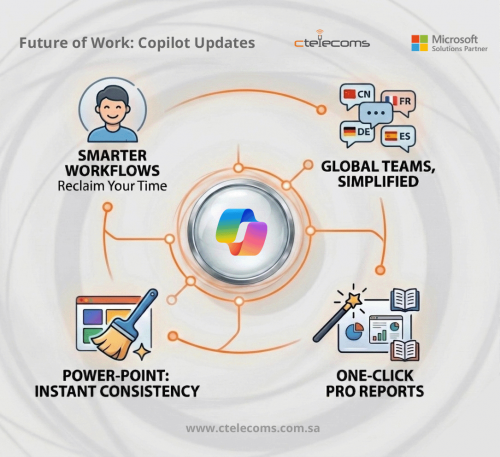
Is your team drowning in meetings and endless spreadsheets? Microsoft 365 Copilot just got a massive power-up to help you reclaim your time. This month, we’re seeing smarter AI in SharePoint, visual meeting summaries, and tighter security controls for peace of mind.
At Ctelecoms, we want to make sure you’re getting the most out of your AI investment. Here is your quick guide to everything new in Copilot this month.
Smarter Ways for Your Team to Work
Expanded Language Support for Copilot Audio Recap
Copilot in Teams has expanded its AI-powered audio recap to seven new languages: Chinese, French, German, Italian, Japanese, Portuguese, and Spanish.
Launched in March, this update allows global users to listen to key discussion points and action items in their preferred language—perfect for multitasking or catching up on the go.
Pro Reports in One Click
The "Researcher" tool can now turn your data into polished PowerPoint slides, PDFs, or even infographics instantly. You don't have to redo the work to make it look good for different audiences.
Introducing AI in SharePoint
Formerly known as Knowledge Agent, the newly rebranded AI in SharePoint brings agentic building and content intelligence to the platform.
Key Highlights:
-
Natural Language Creation: Build sites, libraries, and pages by simply describing them—no technical expertise required.
-
Enhanced Accessibility: Simplifies complex workflows through plain-language commands.
- Availability: Launched in Public Preview in March 2026, with a worldwide rollout scheduled for May 2026.
Smarter Context and Local File Support in Excel
Two major upgrades rolled out in March 2026 for Copilot in Excel:
1. Work IQ Integration
- Automatic Context: Copilot now automatically pulls relevant context from your emails, chats, meetings, and files.
- Smarter Edits: You no longer need to manually reference outside documents. Copilot uses this background information to make accurate, multi-step spreadsheet edits.
- Cloud-Free Flexibility: Copilot can now make multi-step edits to modern Excel workbooks stored locally on your device.
- Cross-Platform: Available for both Windows and Mac, removing the requirement to store your files in the cloud to use Copilot.
2. Local Workbook Editing
- Cloud-Free Flexibility: Copilot can now make multi-step edits to modern Excel workbooks stored locally on your device.
- Cross-Platform: Available for both Windows and Mac, removing the requirement to store your files in the cloud to use Copilot.Rolled out in March, Copilot in Word now automatically displays citations whenever it uses information from the web or Work IQ sources.This update ensures greater accuracy and transparency by allowing users to easily verify the origins of AI-generated content and maintain reliable referencing throughout their documents. Now available via the "Edit with Copilot" feature, users can instantly standardize a presentation’s appearance. This tool automatically updates fonts, font sizes, and bullet styles across all slides simultaneously, replacing tedious manual formatting.Key Benefits:
- Consistency: Ensures a polished, professional look throughout the entire deck.
- Efficiency: Streamlines the design process so you can focus on content rather than styling.
- Availability: Launched on Web in March 2026, with Windows and Mac rollouts coming soon.
Improved Transparency: Citations in Copilot for Word
Rolled out in March, Copilot in Word now automatically displays citations whenever it uses information from the web or Work IQ sources.
This update ensures greater accuracy and transparency by allowing users to easily verify the origins of AI-generated content and maintain reliable referencing throughout their documents.
Standardize Format with Copilot in PowerPoint
Now available via the "Edit with Copilot" feature, users can instantly standardize a presentation’s appearance. This tool automatically updates fonts, font sizes, and bullet styles across all slides simultaneously, replacing tedious manual formatting.
Key Benefits:
-
Consistency: Ensures a polished, professional look throughout the entire deck.
-
Efficiency: Streamlines the design process so you can focus on content rather than styling.
- Availability: Launched on Web in March 2026, with Windows and Mac rollouts coming soon.
Better Control for Admins & Managers
Safeguard Prompts and Web Searches with Microsoft Purview DLP
Microsoft Purview Data Loss Prevention (DLP) is expanding its real-time protections to prevent sensitive data from leaving your organization via Copilot.
1. Web Search Safeguards
This update prevents Copilot from using sensitive information (found in prompts) to perform external web searches. Instead, Copilot will ground its responses solely in internal data sources, mitigating the risk of data leakage.
- Status: Public Preview in March 2026; Worldwide rollout in June 2026.
2. Prompt Protection
Admins can now define policies to detect sensitive data—such as financial info, national IDs, or custom types—directly within user prompts. If detected, DLP can restrict Copilot from:
- Responding to the prompt.
- Connecting to internal data sources.
- Performing web searches.
- Status: Rolled out in March 2026.
New Admin Controls for Copilot and Content Relevance
Two new administrative features are rolling out to the Microsoft 365 admin center to help IT teams optimize Copilot performance and manage costs.
1. Authoritative Source Management
Admins can now designate specific SharePoint Online sites as "authoritative." This tells Copilot to prioritize these sites in its search results, ensuring that the AI provides more relevant, high-ranking information based on your organization’s most trusted data.
- Status: Rolling out in April 2026.
2. High-Usage User Insights
A new reporting category identifies "high-usage users"—individuals with high consumption of Copilot's usage-based (pay-as-you-go) services. This gives IT and finance teams early visibility into potential cost drivers, helping them:
- Optimize license allocation.
- Investigate usage patterns.
- Ensure AI spending aligns with business value.
- Status: Rolled out in March 2026.
Enhanced Analytics in the Copilot Dashboard
The Copilot Dashboard is adding deeper insights to help organizations measure sentiment and specific use cases.
1. User Satisfaction Tracking
Analysts can now measure user sentiment at scale by viewing a breakdown of "thumbs up" and "thumbs down" feedback for Copilot responses.
- Key Insights: View satisfaction trends over time and compare sentiment across different departments or groups.
- Status: Rolled out in March 2026.
2. Intent and Usage Metrics
New metrics allow admins to see exactly how employees are using Copilot across Microsoft 365 apps.
- Tracked Tasks: Monitor activity in the Copilot app, Edge, and OneNote.
- Intent Analysis: Analyze specific scenarios in Word, Excel, and PowerPoint—such as suggested replies, translations, coaching, and data cleaning.
- Status: Rolling out in April 2026.
Copilot Tuning Templates in Agent Builder
Microsoft has introduced Copilot Tuning templates within Agent Builder, allowing organizations to create highly specialized AI agents for specific, repeatable tasks.
What’s New:
- Specialized Templates: New "ready-to-use" recipes for drafting complex documents, validating content against organizational guidelines, and editing text to match a specific corporate voice or style.
- Deep Customization: Organizations can "tune" the agent’s context, tools, and underlying models using their own proprietary data (via SharePoint snapshots) to ensure the AI follows internal processes and standards.
- No-Code Interface: Business users and domain experts can guide the tuning process using natural language and curated examples rather than technical coding.
- Requirements: This feature is available to enterprises with 5,000 or more Microsoft 365 Copilot licenses.
- Frontier Program: Rolling out in April 2026.
- Worldwide Availability: Expected to complete by June 2026.
Eligibility & Rollout:
- Requirements: This feature is available to enterprises with 5,000 or more Microsoft 365 Copilot licenses.
- Frontier Program: Rolling out in April 2026.
- Worldwide Availability: Expected to complete by June 2026.
Ready to Lead the AI Revolution?
Keeping up with AI can feel like a full-time job. At Ctelecoms, we specialize in helping businesses integrate Microsoft 365 Copilot seamlessly while keeping your data secure.
Contact Ctelecoms Today to learn how we can help you optimize your Microsoft 365 environment!