



2026/09/30 Microsoft Cloud Solutions 9 visit(s) 2 min to read
Ctelecoms
Passwords and SMS-based authentication have been used for years to protect business accounts.
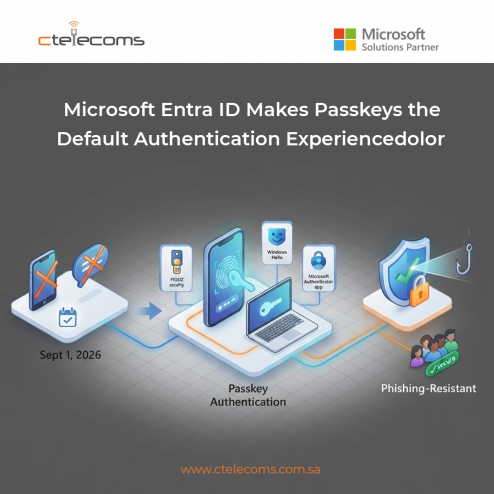
Starting September 1, 2026, Microsoft began rolling out passkeys as the default authentication experience in Microsoft Entra ID.
The change is part of Microsoft's wider effort to reduce dependence on authentication methods that can be targeted through phishing and social engineering.
A passkey is a passwordless sign-in method based on public-key cryptography.
Instead of asking users to enter a password or receive a code by SMS, the user can authenticate using a method supported by their device.
Depending on the setup, this can include a device-based passkey, Microsoft Authenticator, Windows authentication or a FIDO2 security key.
Passkeys are designed to resist phishing because there is no password or shared secret that can simply be entered into a fake website.
Microsoft began rolling out passkeys as the default authentication experience in Entra ID.
As the change reaches an organization, users who are enabled for SMS or voice authentication can be prompted to register a passkey during multifactor authentication.
This means organizations should not wait until the end of the transition to review their authentication policies.
Microsoft has also announced a longer-term change.
On February 1, 2027, Microsoft-provided SMS and voice authentication will end as a native Microsoft Entra capability.
Organizations that still have a business, technical or regulatory requirement for SMS or voice will have the option to work with supported telecom providers through the Microsoft Security Store.
For most organizations, however, Microsoft recommends moving users toward passkeys or another phishing-resistant authentication method.
SMS and voice authentication can be targeted through different forms of social engineering and account attacks.
Passkeys use a different security model.
Because they rely on cryptographic credentials rather than a code that a user reads and enters, they can provide stronger protection against phishing while also making sign-in easier for users.
Microsoft has also reported that AI-assisted phishing is increasing the scale and sophistication of attacks, making stronger authentication more important.
Organizations using Microsoft Entra ID should start with a review of their current authentication methods.
Key steps include:
Review which users and groups still depend on these methods.
Choose the passkey types that fit your users, devices and security requirements.
Start with a small group before expanding the deployment across the organization.
Users should know what will change and how to register their passkey.
Strong authentication should be supported by a clear account recovery process that does not depend entirely on easily phished credentials.
The move to passkeys also fits into a broader Zero Trust approach.
Identity is increasingly treated as a central security layer because users can access cloud applications, business data and services from many locations and devices.
Strong authentication helps organizations reduce the risk of compromised credentials becoming a path into business systems.
Ctelecoms helps Saudi businesses strengthen identity and access security using Microsoft technologies.
Our experts can assess your Microsoft Entra environment, review authentication methods and help plan a practical transition toward stronger, passwordless authentication.
Need help preparing your Entra ID environment for the move to passkeys? Talk to Ctelecoms' experts.

Upgrade your IT to be as agile and efficient ...