






2026/09/30 Microsoft Cloud Solutions 10 visit(s) 2 min to read
Ctelecoms
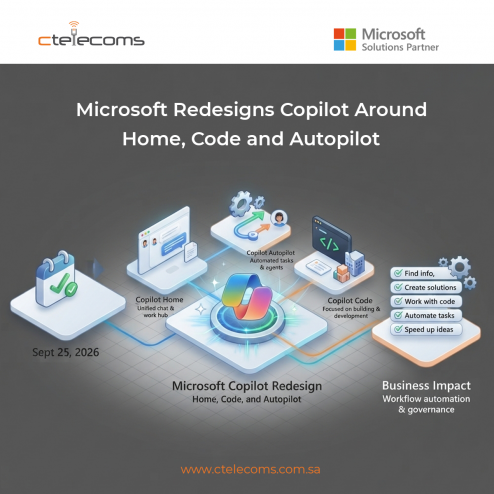
On September 25, 2026, Microsoft introduced a redesigned Copilot experience built around three main areas: Home, Code and Autopilot.
The change reflects a wider shift in how Microsoft sees AI at work. Copilot is no longer positioned only as a tool for asking questions or generating content. It is becoming a place where users can work, build, and automate tasks.
Home brings everyday Copilot experiences together in one place.
It combines chat and work-focused capabilities so users can move more easily between asking questions, working with information and getting help with tasks.
For businesses, this can make Copilot easier to use across everyday work. Employees can start with a simple request and continue working without having to move between several separate AI experiences.
The new Code experience is focused on building.
Microsoft is expanding access to tools that allow users to create solutions and work with code. This can help technical teams build and test applications while also giving other users new ways to turn ideas into working solutions.
This is particularly relevant for organizations looking at low-code development, application modernization and internal business tools.
Autopilot focuses on tasks that can continue working with less manual input.
Instead of only responding to a prompt, an agent can work through a longer task and continue taking actions according to the instructions and permissions it has been given.
This creates new opportunities for businesses to automate repetitive work.
However, automation also makes governance important. Organizations need to understand what an AI agent can access, what actions it can take and how those actions are controlled.
The new Copilot design points to a future where employees do more than simply ask AI for answers.
They can use AI to:
For organizations using Microsoft 365, Azure and other Microsoft services, this direction could make AI more closely connected to existing business workflows.
The important question is not simply whether a company should use Copilot. It is how Copilot and AI agents should be introduced, governed and connected to the organization's existing systems.
Introducing AI into a business requires more than enabling a new feature.
Ctelecoms helps businesses in Saudi Arabia assess their Microsoft environment, identify practical opportunities for Microsoft 365, Azure and AI, and build solutions around their business needs.
From planning and implementation to security and ongoing optimization, the right approach can help organizations adopt Copilot while keeping control over their data, users and workflows.
Want to explore what Microsoft Copilot can do for your business? Talk to Ctelecoms' experts.

Upgrade your IT to be as agile and efficient ...